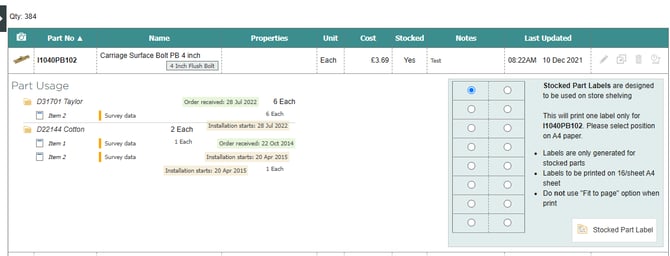
Key Points: Finding the Number of Orders including a Specific Part
1. Navigate to the part list
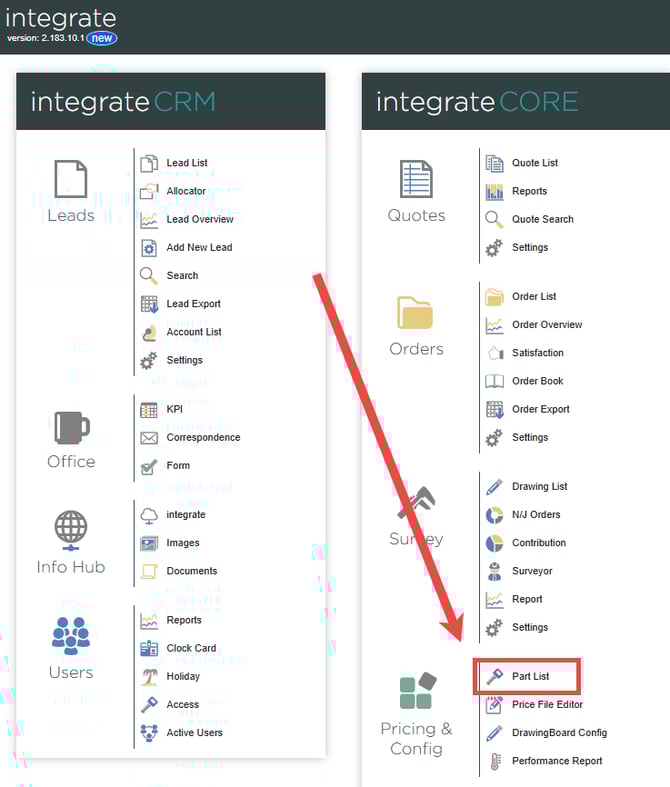
Navigate to integrate dashboard, select part list.
2. Navigate to the ironmongery tab
Selecting the part list will load the general part list page, click on the ironmongery tab.

3. Find the specific part
The ironmongery part list will now be visible, showing every ironmongery part contained within the system.
Locate the desired part by using the part name or number, then click the part number on the record.
Note: Save time looking for part using the keyboard shortcut Ctrl + F to enter a search against the entire page for the part.

4. Display orders using the specific part
Once the specific part has been found, all the orders which use the part will be displayed.