Key Points: Understanding the Production Performance Tab
1. Locate production reports
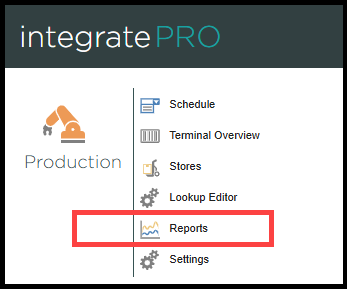
From the integrate home page, navigate to integratePRO, select reports in the production list.
2. Navigate to the performance page
There are two ways to locate the performance page:
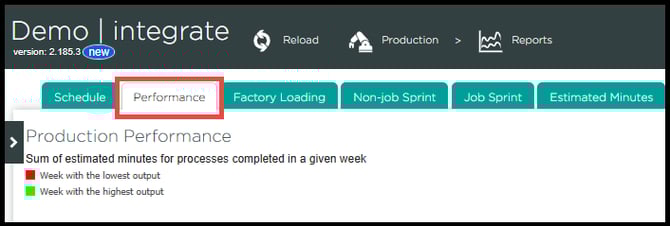
a. From the reports page, click the performance tab
b. Add Production/Reports/ProductionPerformance in the browser to the end of your company URL, for example, https://Example.work/Production/Reports/ProductionPerformance
3. Production performance report view
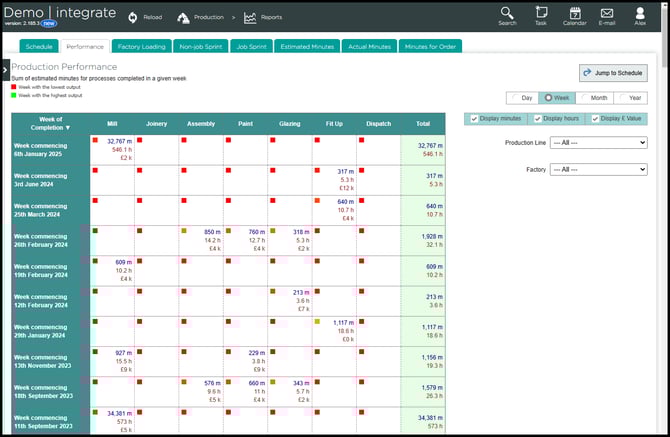
The production performance report provides an overview of the total number of estimated production minutes for each week, and a breakdown of production item value, by process, per week.
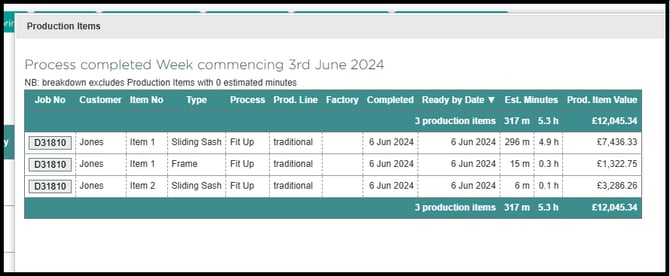
Tick any box within the report to view a detailed breakdown of the estimated minutes and production value for each individual item.
4. Most productive and least productive weeks
Each box has a small coloured square located in the top left of each cell, indicating the most productive and least productive weeks (in estimated minutes). The coloured boxes are based on a colour spectrum:
Green - The week with the highest output
Red - The week with the lowest output
Other colours - All other values fall between green and red, and will be coloured accordingly
5. Customise report view
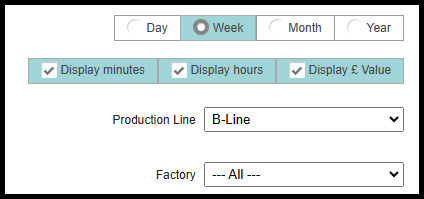
Various elements of the report can be customised to fit a specific time frame or data requirements. Select one of the four adjustable options in the top right corner to tailor the report:
Time Frame - Four checkboxes allow the viewable length of time displayed from per day to per year to be changed
Displayed columns - Ticking or unticking the one of the three tick boxes will show/hide the selected data within the report
Production line - If the organisation has multiple production lines this option will appear to allow one or all of the production lines to be isolated
Factory - If the organisation has multiple factories this option will appear to allow one or all of the factories to be isolated