How Weights are Calculated:
Glass Weight:
Glass volume (mm3) = actual width (mm) * actual height (mm) * thickness of panes (4/16/4 glass = 8mm thickness)
Glass volume (m3) = glass volume (mm3) / 1,000,000,000
Glass weight (kg) = glass volume (m3) * 2500
Glass weight (lb) = glass weight (kg) * 2.2
The system makes some assumptions when calculating glass weight, so it will likely be slightly different to the number you get from manually calculating it. These assumptions include:
-
there is 1 glass unit in the sash, ticking individual panes doesn't change anything
-
the glass hidden in the rebate is 15mm on all sides
-
we use estimated widths and heights, so if the sightline is 500mm, we use 530mm for the calculation
- raked and curved glass will act as if they were unshaped
Solid and astragal bars add weight, but are treated the same.
Timber Weight:
Timber weight = timber volume (m3) * density (kg/m3)
Volume can be found by writing a validation rule that includes a volume variable, and running it on your drawing.
Density values can be found on this page:
/Production/Settings/weight_calc
They can be adjusted here for survey drawings to change the weights on production outputs.
Panels:
Uses panel material, or sash material if not specified. A hardcoded value is used if the thickness and insulation thicknesses aren't specified.
Panel volume = (Panel thickness (mm) - insulation thickness (mm)) * panel area (mm2)
Panel weight (kg) = panel volume (m3) * density (kg/m3)
Whole Item Weight:
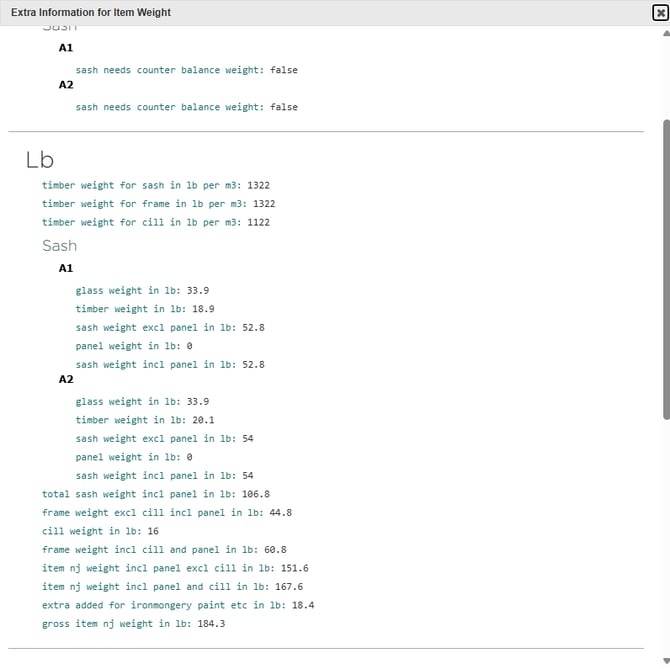
10% of the item new joinery weight is added on to account for ironmongery, paint, etc.
Debugging:
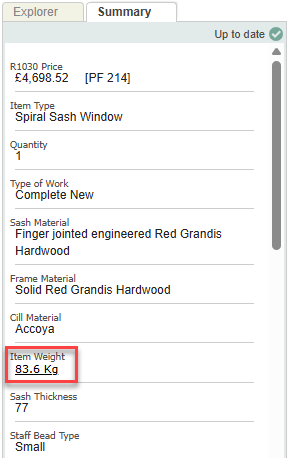
We have a tool for debugging item weight, which is accessed through the Summary tab on the Drawing Board. Clicking this will show more detail about how the weight is calculated.